
Cloud-Based Manufacturing Software: The Complete 2026 SMB Guide
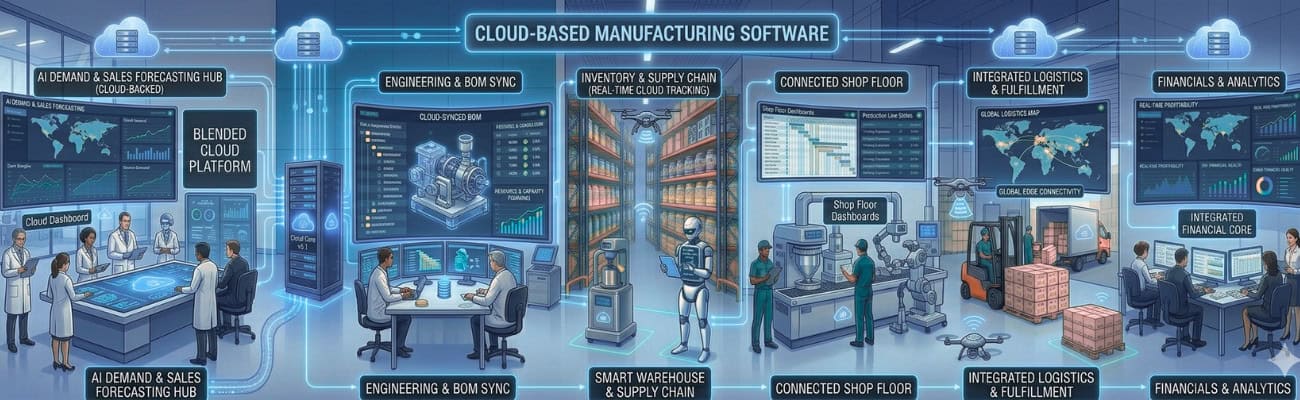
If your manufacturing operations still rely on spreadsheets, disconnected inventory tools, and manual order entry, you are not just inefficient — you are leaving growth on the table. Cloud-based manufacturing software gives small and mid-sized manufacturers (SMBs) the real-time visibility, automated workflows, and financial clarity needed to compete in 2026 and beyond.
The numbers back this up: manufacturing leads all industries in ERP adoption, accounting for 47% of new implementations (RubinBrown, 2025), and 92% of high-performing SMBs already use or plan to use ERP systems (Cargoson/Gartner, 2025). Yet many smaller manufacturers are still running on fragmented tools that cost them time, margin, and competitive ground every single day.
This guide explains what cloud manufacturing ERP software is, how its core modules work together, how to choose the right vendor using a proven 7-point checklist, and how to execute a low-disruption implementation. Whether you manufacture discrete parts, process goods, or manage complex bills of materials, this guide gives you a clear path forward.
What You Will Learn in This Guide
- The exact modules that define a complete cloud-based manufacturing ERP and how they connect
- Why unified ERP outperforms disconnected point solutions — backed by industry data
- A 7-point vendor evaluation checklist you can use in your next software demo
- A phased implementation roadmap to go live without disrupting production
- Expert answers to the most common cloud ERP questions in our FAQ section
What Is Cloud-Based Manufacturing Software? (And Why It Matters in 2026)
Cloud-based manufacturing software is an enterprise resource planning (ERP) system hosted on remote servers and accessed via the internet. Unlike traditional on-premise software installed on local hardware, cloud manufacturing ERP is subscription-based, automatically updated, and accessible from any device with an internet connection.
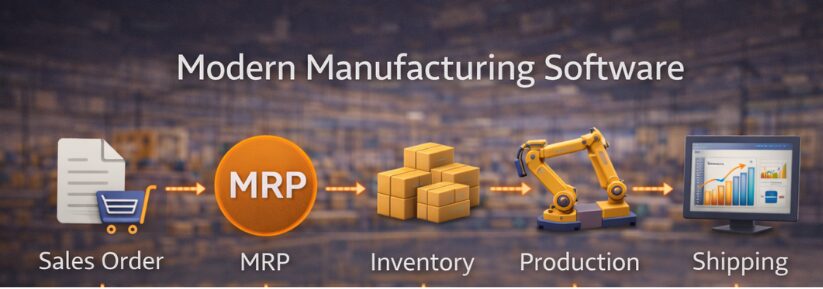
The most important distinction is not where the software lives — it is what it connects. A modern cloud manufacturing platform integrates your sales orders, material requirements planning (MRP), inventory management, production scheduling, and financial reporting into one unified system. Data entered in one module flows automatically through the rest, eliminating manual re-entry, reducing errors, and giving every department a single source of truth.
Cloud vs. On-Premise Manufacturing Software: The Key Differences
Manufacturers who have not yet moved to the cloud often cite familiarity with existing systems as the reason for staying. But the data tells a different story: 70.4% of all ERP deployments were cloud-based in 2024, up from 69.8% in 2023, and that share is expected to reach 75% by 2026 (DocuClipper, 2025). The shift is not a trend — it is a structural change in how manufacturers operate.
On-premise manufacturing software requires:
- Dedicated server hardware that must be purchased, maintained, and eventually replaced
- Internal IT staff or expensive consultants to manage upgrades and security patches
- Manual backups with limited disaster recovery options
- Rigid capacity that cannot scale easily when you add product lines or locations
Cloud-based manufacturing ERP delivers:
- Lower upfront investment with predictable monthly subscription pricing
- Automatic software updates and security patches managed by the vendor
- Remote access for plant managers, warehouse staff, and executives from any location
- Elastic scalability to add users, warehouses, and product lines without re-architecting
- Built-in redundancy and cloud-hosted backups that protect your data around the clock
The Three Operational Problems Cloud Manufacturing ERP Solves
For SMB manufacturers, operational chaos rarely has a single root cause. It is usually the compound effect of several interconnected problems — all of which a unified ERP is specifically designed to eliminate.
1. No Real-Time Visibility
When inventory counts live in one spreadsheet, production schedules in another, and financial reports are generated weekly by hand, decision-makers are always working with stale data. Cloud ERP delivers live dashboards across all departments so you can act on what is happening now, not what happened last week. Organizations implementing ERP report a 36% reduction in business decision-making time (Founderjar).
2. Chronic Inventory Inefficiency
Overstock ties up cash. Stockouts halt production lines. Both are predictable outcomes of poor demand planning and disconnected inventory systems. 91% of companies that went live with ERP for at least one year reported optimized inventory levels as a primary benefit (DocuClipper, 2025). A cloud manufacturing platform synchronizes your purchasing, inventory, and production data so you maintain optimal stock levels without excess carrying costs or surprise shortages.
3. Disconnected Departmental Workflows
Sales teams confirm orders without checking production capacity. Purchasing re-enters data already captured by sales. Finance closes the books manually every month, reconciling numbers across three separate systems. A unified ERP eliminates these silos. 78% of organizations reported improved productivity after ERP implementation, and 62% reported direct, measurable cost reductions (DocuClipper, 2025).
The Anatomy of a Modern Manufacturing ERP: Core Modules Explained
A cloud-based manufacturing ERP is only as powerful as the integration between its modules. The best platforms are not collections of loosely connected tools — they are tightly integrated systems where data flows automatically from one stage to the next.
The core data flow of a modern manufacturing ERP looks like this:
Sales Order Management
The ERP lifecycle begins when a sales order is created. In a unified system, that order automatically checks inventory availability, triggers production work orders if materials are insufficient, and updates financial records — all without manual intervention. Sales teams gain real-time access to inventory levels and production schedules, allowing them to set accurate delivery commitments from day one.
Material Requirements Planning (MRP)
MRP is the engine behind production efficiency. It calculates what materials you need, in what quantities, and by what date — based on your bills of materials (BOMs), current inventory levels, and open sales orders. A strong MRP software module eliminates the guesswork from purchasing, reduces lead-time surprises, and ensures your production floor has what it needs before a work order is released. AI-enabled ERP systems with integrated MRP have shown a 20% improvement in forecasting accuracy and a 15% reduction in operational costs (DocuClipper, 2025).
Inventory and Multi-Location Warehouse Management
Inventory is typically a manufacturer’s largest asset — and its greatest vulnerability. A modern cloud ERP provides real-time visibility across all warehouse locations, including lot and serial number tracking, FIFO/FEFO costing methods, and reorder point automation. Whether you operate one facility or five, you always know exactly what you have, where it is, and when you need to replenish it.
Production and Work Order Management
Once an order is confirmed and materials are available, the production module generates work orders, assigns resources, and tracks labor and machine time. Real-time production status gives operations managers the visibility to identify bottlenecks before they delay shipments, and post-production reporting captures actual vs. planned costs so you can continuously improve margins.
Financial Management and Job Costing
When your ERP connects financials directly to production, every job’s profitability becomes visible in real time. Material costs, labor hours, overhead allocation, and revenue are captured automatically as work moves through the floor. This eliminates end-of-month reconciliation surprises and gives leadership the accurate job costing data they need to price future work profitably.
Purchasing and Supplier Management
An integrated purchasing module generates purchase orders directly from MRP signals, tracks supplier lead times, and matches receipts to POs automatically. Over time, your ERP builds a supplier performance history that helps you negotiate better terms and reduce dependency on single-source vendors.
Your 7-Point Checklist for Choosing Cloud Manufacturing Software
Software selection is one of the most consequential decisions an SMB manufacturer will make. Use this 7-point framework to evaluate any vendor with confidence. Note: companies that engage ERP consultants or structured evaluation processes report an 85% implementation success rate, compared to roughly 50% for those that do not (RubinBrown, 2025).
1. Is it truly unified — or just integrated?
Ask the vendor whether modules share a single database or rely on middleware to sync data between separate systems. True unification means no duplicate entry, no sync delays, and no reconciliation gaps. Integrations between separate systems always introduce failure points.
2. Does it support your manufacturing model?
Not all ERP systems are built for every production type. Confirm the software supports your specific model — whether that is discrete manufacturing, process manufacturing, make-to-order, make-to-stock, or a hybrid. Request a demo with your actual BOMs and production scenarios, not just a generic walkthrough.
Discrete manufacturers — producing distinct, countable units like machined parts, assemblies, or electronic components — need strong BOM management, work order tracking, and serial or lot traceability. Process manufacturers — producing goods in batches or continuous flows like food, chemicals, or pharmaceuticals — require formula management, yield tracking, and expiry-date controls.
Make-to-order businesses need the ERP to trigger production only on confirmed orders, while make-to-stock operations rely on demand forecasting and reorder automation to keep finished goods available. Kechie ERP supports all of these models natively, with configurable workflows that adapt to your production type rather than forcing you to change how you manufacture.
3. How does it handle multi-location inventory?
If you operate or plan to operate across multiple warehouses, plants, or distribution points, verify that the system handles cross-location transfers, location-specific costing, and consolidated reporting natively — not through add-ons.
4. Can it scale as your business grows?
Ask about user seat pricing, data storage limits, and the vendor’s history of adding new modules or features. The right cloud ERP should grow with you without requiring a re-implementation every few years. The SMB ERP segment is projected to grow at 7% annually through 2025 (RubinBrown, 2025), meaning more options — and more pressure to choose wisely.
5. What does the implementation process look like?
Request a detailed implementation plan with clear milestones, dedicated support contacts, and realistic timelines. SMBs typically complete ERP implementations in 3–9 months (DocuClipper, 2025). Vague promises of a ‘fast go-live’ without a structured process are a red flag — 64% of ERP projects exceed their initial budget, usually due to poor scoping and underestimated change management (sci-tech-today, 2025).
6. Is reporting real-time and role-specific?
Reporting should surface the right metrics for the right person — production efficiency for plant managers, cash flow for CFOs, on-time delivery for customer service. Confirm that dashboards are configurable without requiring custom development.
7. What is the true total cost of ownership?
Look beyond the monthly subscription fee. Account for implementation services, data migration, per-user pricing at scale, training, and required integrations. The average ERP ROI is 52% — meaning $1.52 returned for every $1 invested — with most companies breaking even within 2.5 years (DocuClipper, 2025). The lowest sticker price rarely represents the lowest total investment.
From Selection to Go-Live: A Phased Implementation Roadmap
A successful ERP implementation is not a software project — it is a business transformation project. Over 58% of organizations prefer a phased implementation approach over a big-bang go-live (DocuClipper, 2025), and for good reason: it reduces disruption, builds team confidence, and allows you to course-correct before problems scale.
Phase 1: Discovery and Process Mapping
Before any configuration begins, document your current workflows in detail. Identify where manual steps, data re-entry, or information gaps exist. This process map becomes both the blueprint for system configuration and the baseline against which you measure improvement post-go-live.
Phase 2: Data Preparation and Cleansing
Migrating dirty data into a new system does not fix your data quality problems — it magnifies them. Audit your item master, customer records, vendor data, and historical inventory counts before migration. Establish clear data ownership so records are maintained accurately going forward.
Phase 3: Configuration and User Acceptance Testing
Work with your implementation partner to configure the system around your documented processes — not the other way around. Run user acceptance testing (UAT) with representative employees from each department. Test your most complex scenarios, not just the easy ones.
Phase 4: Role-Based Training
Train employees on the workflows and screens they will use daily, not on every feature the system offers. Role-based training is faster, more relevant, and results in higher adoption rates than generic system overviews. 77% of successful ERP implementations cite internal alignment and leadership support as critical factors.
Phase 5: Go-Live and Continuous Optimization
Plan your go-live date around a slower production period if possible. Have dedicated support available during the first two weeks. After stabilization, schedule monthly business reviews to identify optimization opportunities — 83% of organizations that conducted a pre-implementation ROI analysis reported meeting or exceeding their expected returns after more than one year live (DocuClipper, 2025).
Why Growing Manufacturers Choose Kechie ERP
The market offers no shortage of point solutions — standalone inventory apps, standalone accounting tools, standalone scheduling platforms. For very early-stage businesses, these can seem sufficient. But as order volume grows and product complexity increases, the cost of maintaining disconnected systems outweighs any savings from cheaper individual tools.
Kechie ERP, developed by My Office Apps, is a fully cloud-based manufacturing ERP serving manufacturers across distribution, retail, and industrial production — from growing mid-market businesses through multi-site enterprise operations. Unlike rigid legacy platforms that require months of costly customisation, Kechie is designed to adapt to your business and scale with it, without requiring re-implementation as your operations grow.
What Makes Kechie Different
- Single unified database: Every module — sales orders, MRP, inventory, production, purchasing, financials, CRM, and logistics — runs on the same proprietary database. No middleware, no sync delays, no reconciliation gaps.
- Purpose-built for manufacturers: Kechie’s manufacturing module manages the full MRP cycle, job creation, bills of materials, work-in-progress tracking, and multi-warehouse inventory in one place.
- Real-time visibility at every level: Kechie features hundreds of report templates and thousands of configurations so plant managers, warehouse staff, and executives each see the data that matters most to their role — updated with every transaction.
- Enterprise-scale, accessible pricing: Kechie delivers the same core ERP capabilities found in large enterprise platforms — multi-warehouse management, MRP, job costing, real-time financials, and CRM — without the implementation overhead or licensing costs that make enterprise systems inaccessible to growing manufacturers. One platform from your first facility to your fifth.
- Recognized by the industry: Kechie has been named one of the 10 Best ERP Systems of 2025 and 10 Best Manufacturing ERPs of 2025 by multiple independent review platforms.
Kechie delivers enterprise-grade capability — full MRP, multi-warehouse inventory, job costing, and real-time financials — without the implementation complexity or cost overhead of traditional enterprise platforms. Whether you are running one facility or scaling across multiple sites, Kechie grows with your operations on a single platform with no forced migration. schedule a free demo to see it in action with your own production scenarios.
Frequently Asked Questions About Cloud Manufacturing ERP
What is cloud-based manufacturing software, exactly?
Cloud-based manufacturing software is an ERP system hosted on remote servers and delivered via the internet. It connects your core operational functions — sales orders, MRP, inventory, production, purchasing, and financials — into a single platform accessible from any internet-connected device. Unlike on-premise systems, it requires no local hardware, is updated automatically by the vendor, and scales with your business without major IT investment.
What is the difference between ERP and MRP?
MRP (Material Requirements Planning) is a subset of ERP focused specifically on production planning — calculating what materials you need, when you need them, and in what quantities. ERP (Enterprise Resource Planning) is the broader system that encompasses MRP but also includes financial management, sales order processing, purchasing, HR, and reporting. For a full breakdown of the distinctions, see our dedicated guide: ERP vs. MRP — What’s the Difference? For manufacturers, a full ERP with an integrated MRP engine is almost always more valuable than a standalone MRP tool.
| MRP Software | ERP Software | |
| Primary Focus | Production & materials planning | End-to-end business management |
| Scope | Production floor & supply chain | Finance, HR, CRM, sales, operations |
| Key Output | Purchase orders & work orders | Unified data across all departments |
| Best For | Early-stage manufacturers needing production control | Growing SMBs needing full operational visibility |
| Includes Financials? | No | Yes — fully integrated |
| Standalone or Embedded? | Can be standalone or inside an ERP | Always a complete platform |
For a deeper comparison, see our full guide: ERP vs. MRP — What’s the Difference?
How long does it take to implement a cloud ERP for a manufacturing SMB?
Most SMB manufacturers can expect a structured implementation to take between 3 and 9 months (DocuClipper, 2025). Businesses with cleaner data, simpler product catalogs, and dedicated internal project owners consistently achieve faster go-live dates. Avoid vendors who promise implementation in days without a structured discovery process — shortcuts lead to poor adoption and costly rework. The most common causes of budget overruns are underestimating project staffing (38%), scope expansion (35%), and data/technical issues (34%) (DocuClipper, 2025).
What should I prioritize when evaluating cloud manufacturing software?
Prioritize true system unification (one database, not integrations), support for your specific manufacturing model, real-time inventory visibility across all locations, and a vendor with a proven implementation methodology for businesses your size. Reporting configurability and total cost of ownership — including implementation, training, and scaling costs — should also be central to your evaluation. Use the 7-point checklist in this guide as your framework.
Can cloud ERP software actually reduce manufacturing costs?
Yes — across multiple areas. ERP systems can reduce operational costs by over 20%, according to independent industry research. Additionally, 62% of organizations report direct cost reductions in purchasing and inventory control (DocuClipper, 2025). Inventory carrying costs decrease when reorder points are automated. Labor costs tied to manual data entry are eliminated. Job costing accuracy improves, allowing more precise pricing on future work. Most SMB manufacturers that commit to a full implementation see measurable cost improvements within the first two to three quarters of use.
Is cloud ERP secure enough for manufacturing businesses?
Modern cloud ERP platforms employ enterprise-grade security including data encryption in transit and at rest, role-based access controls, multi-factor authentication, and SOC 2 compliance. Notably, 94% of businesses reported improved security after moving to the cloud (Forbes). For most SMBs, a reputable cloud vendor’s security infrastructure is significantly more robust than what an on-premise server room can provide. Always ask vendors about their security certifications, uptime SLAs, and data residency policies during evaluation.
Do we need to replace all of our existing systems at once?
Not necessarily. Many manufacturers begin with the highest-impact modules — typically inventory, production, and financials — and phase in additional functionality over time. A phased approach reduces go-live risk and allows your team to build confidence with the new system before expanding its scope. That said, the long-term goal should be a single unified platform; retaining disconnected systems indefinitely preserves the data silos that ERP is designed to eliminate.
What is MRP software and how does it work inside an ERP?
MRP software calculates production material needs based on demand forecasts, open sales orders, and current inventory levels. Inside a unified ERP, MRP does not operate as a separate tool — it runs as an integrated engine that automatically triggers purchase orders, production work orders, and inventory adjustments in real time. For a detailed explanation, see our full guide: What Is MRP Software?.
The Bottom Line: Cloud Manufacturing ERP Is an Operational Decision
Selecting cloud-based manufacturing software is not simply a technology upgrade — it is a decision about how you want your business to operate. The data is clear: manufacturing leads all industries in ERP adoption, the average ROI is 52% within 2.5 years, and 91% of manufacturers who go live report better inventory control as an immediate benefit.
Manufacturers who commit to a unified ERP gain real-time visibility, faster decision-making, and the operational discipline required to scale profitably. Those who delay — continuing to patch together spreadsheets and disconnected tools — trade short-term familiarity for long-term competitive disadvantage.
If you are ready to evaluate cloud manufacturing ERP for your business, schedule a free 20-minute Kechie demo. Come with your current pain points, your production model, and your growth targets. Leave with a clear picture of what the right system can do for your operations.
Sources
DocuClipper. (2025). ERP Statistics 2025: Adoption Trends, Market Size, and Automation Insights. https://www.docuclipper.com/blog/erp-statistics/
RubinBrown / KPC Team. (2025). Top ERP Insights & Statistics. https://kpcteam.com/kpposts/top-erp-statistics-trends
Forbes (2024). Latest Trends And Predictions For The Future of Cloud Hosting. https://www.forbes.com/councils/forbestechcouncil/2024/02/12/latest-trends-and-predictions-for-the-future-of-cloud-hosting/
Founderjar, (2022).The Ultimate List of ERP Statistics for 2025. https://www.founderjar.com/erp-statistics/
Cargoson. (2025). How Big Is the ERP Market? https://www.cargoson.com/en/blog/how-big-is-the-erp-market
Sci-Tech-Today. (2025). ERP Software Statistics. https://www.sci-tech-today.com/stats/enterprise-resource-planning-erp-software-statistics/
SelectHub. (2025). Kechie Reviews: Pricing & Software Features. https://www.selecthub.com/p/erp-software/kechie-erp/
Capterra. (2025). Kechie Manufacturing User Reviews. https://www.capterra.com/p/163480/Kechie/
My Office Apps. (2025). Kechie ERP for Manufacturing. https://www.myofficeapps.com/industries/manufacturing/
In This Article
-What Is Cloud-Based Manufacturing Software? (And Why It Matters in 2026)
-Cloud vs. On-Premise Manufacturing Software: The Key Differences
-The Three Operational Problems Cloud Manufacturing ERP Solves
-The Anatomy of a Modern Manufacturing ERP: Core Modules Explained
-Your 7-Point Checklist for Choosing Cloud Manufacturing Software
-From Selection to Go-Live: A Phased Implementation Roadmap
-Why Growing Manufacturers Choose Kechie ERP
-What Makes Kechie Different
-Frequently Asked Questions About Cloud Manufacturing ERP
-What is cloud-based manufacturing software, exactly?
-What is the difference between ERP and MRP?
-How long does it take to implement a cloud ERP for a manufacturing SMB?
-What should I prioritize when evaluating cloud manufacturing software?
-Can cloud ERP software actually reduce manufacturing costs?
-Is cloud ERP secure enough for manufacturing businesses?
-Do we need to replace all of our existing systems at once?